

The “Not enough margin!” error appears when the margin needed to open your order is more than the free funds in your trading account.
Check the margin before you trade
The order window shows both figures. Compare Required margin with Free funds. In this example, the order needs 2.20 USD of margin but the account has 0.00 USD of free funds, so the order cannot be opened.
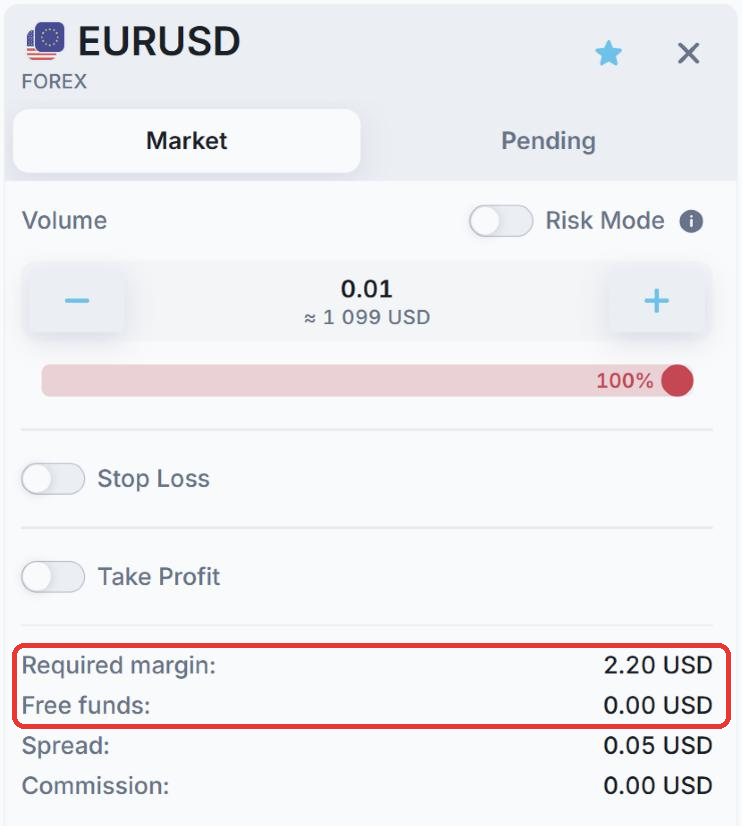
- Required margin: the amount needed to open this position.
- Free funds: the money available to open new positions. It is your equity minus the margin already used by your open positions.
How to fix it
- Reduce the volume: a smaller position needs less margin.
- Deposit more funds: see How to deposit funds.
- Close some open positions: this releases the margin they use.
- Check the timing: around important news and before weekend and holiday breaks, higher margin requirements apply, so the same order can need more margin. See Margin.
To learn how leverage affects margin, see Leverage.