

The “Session is closed” message means the market for that instrument is closed right now, so you cannot trade it at market price. Each instrument has its own trading hours. Markets close at weekends, on holidays and, for some instruments, during a daily break.
1. How to tell that a market is closed
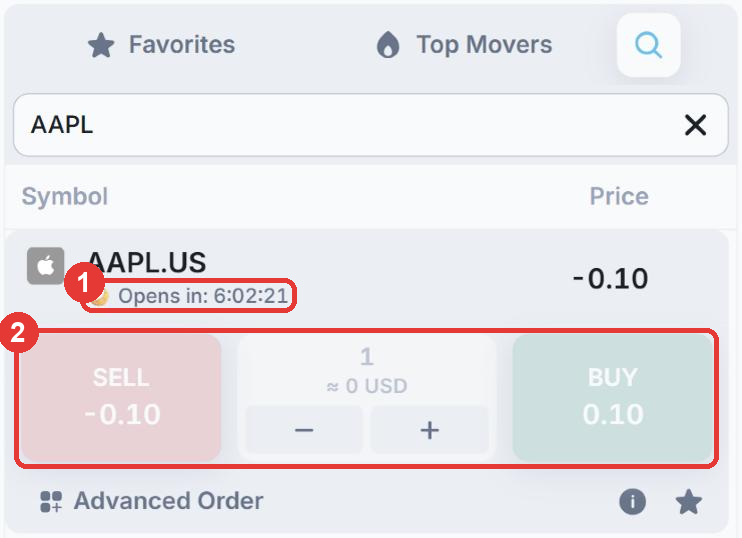
- (1) A moon icon and an Opens in countdown appear under the instrument name. The countdown shows when trading starts again.
- (2) The Sell and Buy buttons are greyed out.
2. Check the market hours
Select the instrument, open Symbol info in the panel at the bottom left and expand Market Hours. In this example, AAPL.US can be traded from 13:30 to 20:00 on weekdays and is closed on Saturday and Sunday.
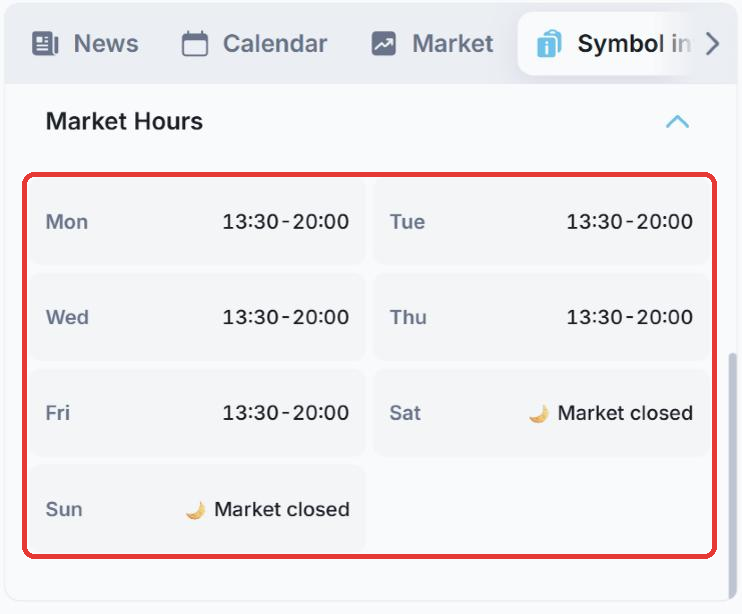
The times use the time zone shown in the top right corner of Fortuno Terminal (for example, UTC +0).
What to do
- Wait until the market opens and try again.
- Trade another instrument that is open now. For example, cryptocurrencies such as BTCUSD trade at weekends.
- If you see this message while the market should be open, restart the platform: click the profile icon in the top right corner and choose Restart app. If the problem continues, contact our support team on Telegram at @fortunosupport.